Simple Network Management Protocol (SNMP) is one of the most widely used protocols for managing and monitoring network devices in IT environments. It allows network administrators to collect information, monitor device performance, and control devices remotely. SNMP plays a crucial role in the health, stability, and efficiency of a network, especially in large-scale or complex infrastructures. Let’s explore the ins and outs of SNMP, its various versions, key components, practical implementation, and how to leverage it effectively depending on network scale, complexity, and device type.
What Is SNMP?
SNMP stands for Simple Network Management Protocol, a standardized protocol used for managing and monitoring devices on IP networks. SNMP enables network devices such as routers, switches, servers, printers, and other hardware to communicate information about their state, performance, and errors to a centralized management system (SNMP manager).
Key Points:
- SNMP is an application layer protocol that operates on port 161 (UDP) for SNMP agent queries and port 162 (UDP) for SNMP traps.
- It is designed to simplify the process of gathering information from network devices and allows network administrators to perform remote management tasks, such as configuring devices, monitoring network performance, and troubleshooting issues.
How SNMP Works
SNMP consists of three main components:
- SNMP Manager: The management system that queries devices and collects data. It can be a network management software or platform, such as SolarWinds, PRTG, or Nagios.
- SNMP Agent: Software running on the managed device that responds to queries and sends traps (unsolicited alerts) to the SNMP manager.
- Management Information Base (MIB): A database of information that defines what can be queried or monitored on a network device. MIBs contain Object Identifiers (OIDs), which represent specific device metrics or configuration parameters.
The interaction between these components follows a request-response model:
- The SNMP manager sends a GET request to the SNMP agent to retrieve specific information.
- The agent responds with a GET response, containing the requested data.
- The SNMP manager can also send SET requests to modify configuration settings on the device.
- The SNMP agent can autonomously send TRAPs (unsolicited alerts) to notify the SNMP manager of critical events like device failure or threshold breaches.
SNMP Versions and Variants
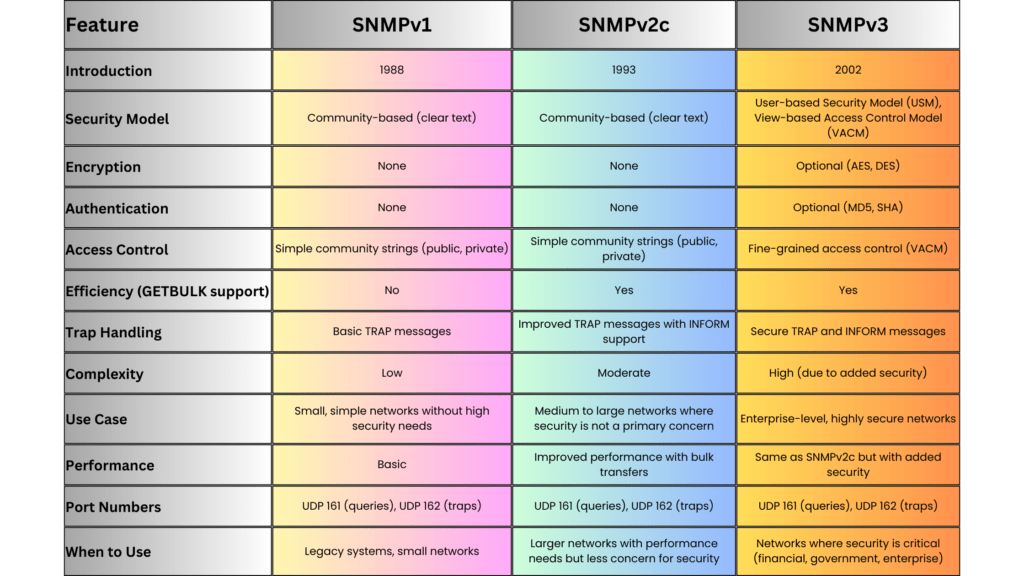
SNMP has evolved over time, with different versions addressing various challenges related to security, scalability, and efficiency. The main versions are:
SNMPv1 (Simple Network Management Protocol Version 1)
-
- Introduction: The earliest version, released in the late 1980s, and still in use in smaller or legacy networks.
- Features: Provides basic management functions, but lacks robust security. Data is sent in clear text, which makes it vulnerable to eavesdropping.
- Use Case: Suitable for simple or isolated network environments where security is not a primary concern.
SNMPv2c (Community-Based SNMP Version 2)
-
- Introduction: Introduced to address some performance and functionality limitations of SNMPv1.
- Features: Improved efficiency with additional PDU types, such as GETBULK, which allows for the retrieval of large datasets in a single request. It still uses community strings (passwords) for security, which is minimal and lacks encryption.
- Use Case: Useful in environments where scalability and performance are needed, but without the strict need for security.
SNMPv3 (Simple Network Management Protocol Version 3)
-
- Introduction: Released to address security flaws in previous versions.
- Features:
-
-
-
-
- User-based Security Model (USM): Introduces authentication and encryption to ensure data integrity and confidentiality. Devices and administrators must authenticate using username/password, and messages can be encrypted using algorithms like AES or DES.
- View-based Access Control Model (VACM): Provides fine-grained access control to determine what data a user or application can access or modify.
- Security Levels: Three security levels: noAuthNoPriv, authNoPriv, and authPriv, offering varying degrees of security.
-
-
-
-
- Use Case: Ideal for large enterprise networks or any environment where security is a concern. SNMPv3 is now the recommended standard for new implementations.
SNMP Over TLS and DTLS
- Introduction: An emerging variant that uses Transport Layer Security (TLS) or Datagram Transport Layer Security (DTLS) to secure SNMP communication.
- Features: Provides better security than SNMPv3 in some contexts by leveraging more robust transport layer encryption.
- Use Case: Suitable for modern, security-conscious organizations where protecting management traffic is a priority.
SNMP Communication Example
Here’s a basic example of how SNMP operates in a typical network as a reference for readers:
Scenario: A network administrator wants to monitor the CPU usage of a optical device.
- Step 1: The SNMP manager sends a GET request to the SNMP agent on the optical device to query its CPU usage. The request contains the OID corresponding to the CPU metric (e.g., .1.3.6.1.4.1.9.2.1.57 for Optical devices).
- Step 2: The SNMP agent on the optical device retrieves the requested data from its MIB and responds with a GET response containing the CPU usage percentage.
- Step 3: If the CPU usage exceeds a defined threshold, the SNMP agent can autonomously send a TRAP message to the SNMP manager, alerting the administrator of the high CPU usage.
SNMP Message Types
SNMP uses several message types, also known as Protocol Data Units (PDUs), to facilitate communication between the SNMP manager and the agent:
- GET: Requests information from the SNMP agent.
- GETNEXT: Retrieves the next value in a table or list.
- SET: Modifies the value of a device parameter.
- GETBULK: Retrieves large amounts of data in a single request (introduced in SNMPv2).
- TRAP: A notification from the agent to the manager about significant events (e.g., device failure).
- INFORM: Similar to a trap, but includes an acknowledgment mechanism to ensure delivery (introduced in SNMPv2).
SNMP MIBs and OIDs
The Management Information Base (MIB) is a structured database of information that defines what aspects of a device can be monitored or controlled. MIBs use a hierarchical structure defined by Object Identifiers (OIDs).
- OIDs: OIDs are unique identifiers that represent individual metrics or device properties. They follow a dotted-decimal format and are structured hierarchically.
- Example: The OID .1.3.6.1.2.1.1.5.0 refers to the system name of a device.
Advantages of SNMP
SNMP provides several advantages for managing network devices:
- Simplicity: SNMP is easy to implement and use, especially for small to medium-sized networks.
- Scalability: With the introduction of SNMPv2c and SNMPv3, the protocol can handle large-scale network infrastructures by using bulk operations and secure communications.
- Automation: SNMP can automate the monitoring of thousands of devices, reducing the need for manual intervention.
- Cross-vendor Support: SNMP is widely supported across networking hardware and software, making it compatible with devices from different vendors (e.g., Ribbon, Cisco, Ciena, Nokia, Juniper, Huawei).
- Cost-Effective: Since SNMP is an open standard, it can be used without additional licensing costs, and many open-source SNMP management tools are available.
Disadvantages and Challenges
Despite its widespread use, SNMP has some limitations:
- Security: Early versions (SNMPv1, SNMPv2c) lacked strong security features, making them vulnerable to attacks. Only SNMPv3 introduces robust authentication and encryption.
- Complexity in Large Networks: In very large or complex networks, managing MIBs and OIDs can become cumbersome. Bulk data retrieval (GETBULK) helps, but can still introduce overhead.
- Polling Overhead: SNMP polling can generate significant traffic in very large environments, especially when retrieving large amounts of data frequently.
When to Use SNMP
The choice of SNMP version and its usage depends on the scale, complexity, and security requirements of the network:
Small Networks
-
Use SNMPv1 or SNMPv2c if security is not a major concern and simplicity is valued. These versions are easy to configure and work well in isolated environments where data is collected over a trusted network.
Medium to Large Networks
-
Use SNMPv2c for better efficiency and performance, especially when monitoring a large number of devices. GETBULK allows efficient retrieval of large datasets, reducing polling overhead. -
Implement SNMPv3 for environments where security is paramount. The encryption and authentication provided by SNMPv3 ensure that sensitive information (e.g., passwords, configuration changes) is protected from unauthorized access.
Highly Secure Networks
-
Use SNMPv3 or SNMP over TLS/DTLS in networks that require the highest level of security (e.g., financial services, government, healthcare). These environments benefit from robust encryption, authentication, and access control mechanisms provided by these variants.
Implementation Steps
Implementing SNMP in a network requires careful planning, especially when using SNMPv3:
Step 1: Device Configuration
- Enable SNMP on devices: For each device (e.g., switch, router), enable the appropriate SNMP version and configure the SNMP agent.
- For SNMPv1/v2c: Define a community string (password) to restrict access to SNMP data.
- For SNMPv3: Configure users, set security levels, and enable encryption.
Step 2: SNMP Manager Setup
- Install SNMP management software such as PRTG, Nagios, MGSOFT or SolarWinds. Configure it to monitor the devices and specify the correct SNMP version and credentials.
Step 3: Define MIBs and OIDs
- Import device-specific MIBs to allow the SNMP manager to understand the device’s capabilities. Use OIDs to monitor or control specific metrics like CPU usage, memory, or bandwidth.
Step 4: Monitor and Manage Devices
- Set up regular polling intervals and thresholds for key metrics. Configure SNMP traps to receive immediate alerts for critical events.
SNMP Trap Example
To illustrate the use of SNMP traps, consider a situation where a router’s interface goes down:
- The SNMP agent on the router detects the interface failure.
- It immediately sends a TRAP message to the SNMP manager.
- The SNMP manager receives the TRAP and notifies the network administrator about the failure.
Practical Example of SNMP GET Request
Let’s take an example of using SNMP to query the system uptime from a device:
- OID for system uptime: .1.3.6.1.2.1.1.3.0
- SNMP Command: To query the uptime using the command-line tool snmpget:
snmpget -v2c -c public 192.168.1.1 .1.3.6.1.2.1.1.3.0Here,
-v2c specifies SNMPv2c,

-c public specifies the community string,

192.168.1.1 is the IP of the SNMP-enabled device, and

.1.3.6.1.2.1.1.3.0 is the OID for the system uptime.
DISMAN-EVENT-MIB::sysUpTimeInstance = Timeticks: (5321) 0:00:53.21SNMP Alternatives
Although SNMP is widely used, there are other network management protocols available. Some alternatives include:
- NETCONF: A newer protocol designed for network device configuration, with a focus on automating complex tasks.
- RESTCONF: A RESTful API-based protocol used to configure and monitor network devices.
- gNMI (gRPC Network Management Interface): An emerging standard for telemetry and control, designed for modern networks and cloud-native environments.
Summary
SNMP is a powerful tool for monitoring and managing network devices across small, medium, and large-scale networks. Its simplicity, wide adoption, and support for cross-vendor hardware make it an industry standard for network management. However, network administrators should carefully select the appropriate SNMP version depending on the security and scalability needs of their environment. SNMPv3 is the preferred choice for modern networks due to its strong authentication and encryption features, ensuring that network management traffic is secure.