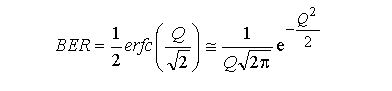
Bit Error Rate (BER) is a crucial performance metric. DWDM technology enables the transmission of multiple data streams along the same optical fiber by using different wavelengths (or channels) for each data stream, significantly increasing the capacity of the network.
Pre-FEC BER corresponding to Q.
Before applying FEC, which is a method used to detect and correct errors in the transmitted data, the BER can be determined by the Q-factor. The Q-factor, in simple terms, measures the signal strength relative to the noise level in the system, and it’s a dimensionless parameter. The relationship between BER and Q can be mathematically represented and also calculated through the use of functions available in spreadsheet software like Excel. For example, to convert BER to a Q-factor in decibels (dBQ) in Excel, you can use the formula:

dBQ = 20 * LOG10(-NORMSINV(BER))
And to convert the Q-factor to dBQ:
dBQ = 20 * LOG10(Q)
Post-FEC BER/Q
After FEC has been applied, the BER should ideally be reduced to a level where no errors occur, or they are so infrequent that they have virtually no impact on the quality of the communication link. A post-FEC BER of less than 1×10⁻¹⁵ is considered as having no errors, corresponding to a Q-factor of about 18dBQ. This is typically the limit of what can be measured with precision in optical systems.
FEC Limit
FEC limit refers to the threshold below which the FEC can reliably correct errors. If the pre-FEC BER is above this threshold, the FEC will not be able to correct all errors, leading to post-FEC errors. Each FEC scheme has its own limit, defined by the lowest Q-factor it can handle or the highest BER it can correct. For instance:
- An FEC limit of 8.53dBQ corresponds to a pre-FEC BER of 3.8×10⁻³, which means that the FEC can correct errors down to this level.
- Similarly, an FEC limit of 5.23dBQ corresponds to a pre-FEC BER of 3.4×10⁻², indicating that the FEC needs at least 97% of the bits to be correct to function effectively.
In designing DWDM systems, understanding these limits is critical to ensure that the link maintains a high level of data integrity and availability. The choice of FEC is a balance between the computational complexity (and therefore power consumption and latency) and the desired link performance in terms of BER. As DWDM systems push towards higher speeds and more closely spaced wavelengths, the FEC becomes increasingly important in maintaining reliable communications.